 Cheevotron
ModRetro Chromatic
SupportedAchievements on the ModRetro Chromatic.
Play your original Game Boy and Game Boy Color cartridges and earn achievements with the phone in your pocket. Unlocks pop up on the Chromatic's own screen, with a chime from its speaker.
One email at launch, one per release. No spam.
- Original cartridges and EverDrive GB flash carts
- Bluetooth: lock the phone and put it away
- Firmware from your phone in about two minutes, backup first
How it works
Three steps, no computer.
Install the firmware
Connect the Chromatic to your phone with a USB-C cable and tap Install. The app saves your original firmware first, and about two minutes later the Chromatic runs Cheevotron.
Pair over Bluetooth
Pick your Chromatic in the app once. From then on it connects by itself whenever you switch it on nearby.
Play
Insert a cartridge and switch on. The Chromatic says it's ready, and every unlock pops up on its screen and lands on your Cheevotron profile.
A new cartridge is read once to identify the game, so the game restarts once. After that it's recognised right away.
Pocket mode
Leave the phone in your pocket.
The Chromatic talks to your phone over Bluetooth. Lock the phone, put it away and play. Unlocks appear right on the Chromatic's screen, and your phone's mobile data sends them to your profile: on the train, in the park, anywhere with signal.
- Bluetooth, screen off
Every frame, 60 times a second, tested in sessions of well over an hour with the phone locked.
- It tells you when it's ready
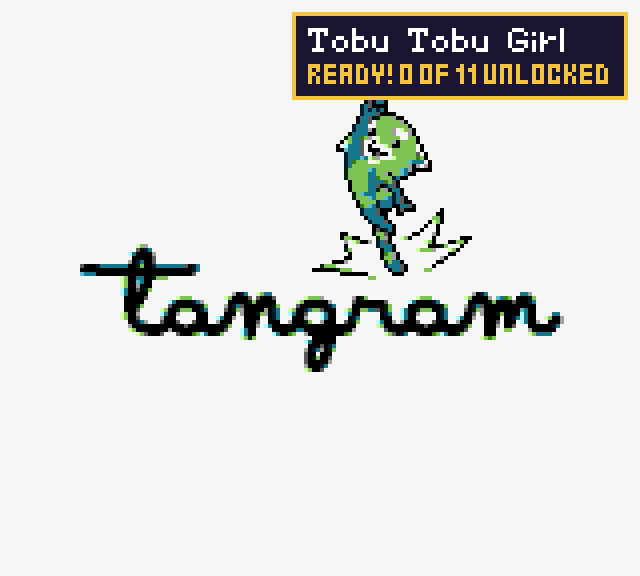
Switch on and the Chromatic says "Ready!" with your progress and a rising chime. Phone not around? It tells you that too. Open the menu and the corner shows the phone link.
- Mobile data on the go
The Chromatic only has Wi-Fi. Your phone brings 5G and LTE, so you don't need a hotspot.
- No signal? No problem
Unlocks wait safely on the phone and go out as soon as you're back online, even after a restart.
On the console
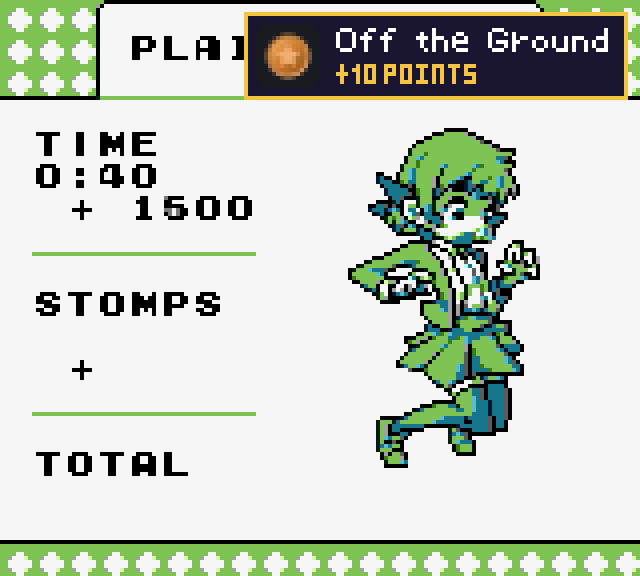
Unlocks on the screen you're already looking at.
A small toast with the badge, title and points, or just the badge. Put it in any of six spots so it never hides what matters in your game, and hear the chime from the Chromatic's own speaker. Try it: tap a spot.
What you need
A Chromatic, your cartridges, your phone.
- A ModRetro Chromatic with Cheevotron's firmware. The app installs it; ModRetro's own firmware doesn't share the console's memory.
- Game Boy or Game Boy Color cartridges, or an EverDrive GB flash cart.
- An Android phone with Android 9 or newer and Bluetooth.
- A USB-C data cable, once, to install the firmware. You can also play on the cable instead of Bluetooth.
- A Cheevotron account, and later this console's connector. Sign up with your email in the app. Your first 10 achievements on this console let you try it on your own hardware, and they stay yours; for more, the connector is a one-time purchase (prices).
Game support
Nearly every cartridge.
Works
Cartridges with these memory controllers, which covers nearly every game:
Save RAM counts too. The Chromatic keeps a live copy of the cartridge's save RAM, so achievement sets that read it work on a real cartridge.
Not yet
EverDrive GB: Cheevotron spots the game you pick in its menu and follows it. Sets that read save RAM don't work with EverDrive games yet.
Something doesn't work?
We can't test every Game Boy cartridge. If one of yours doesn't work, write to hello (at) cheevotron (dot) com with the game's name and region, and we'll look into it.
Firmware
Installed from your phone. Undone from your phone.
Cheevotron's firmware is a build of ModRetro's open-source firmware (GPL-3) with two additions: the Bluetooth link to the app and the pop-ups on the screen. Your games, saves, the menu and ModRetro's features stay as they are.
Your original, saved
Before the first write the app backs up both of the console's chips and keeps a copy in your Downloads.
Every write checked
The app reads back what it wrote and compares it before it moves on. Updates come the same way, and the app tells you when one is ready.
Back to stock any time
One tap restores ModRetro's firmware, even if a write was interrupted and the console doesn't start.
Honest about the risk. We test every release carefully on our own consoles, but installing community firmware is at your own risk, and we can't be responsible for damaged or unusable devices. The app always makes a backup first. How the install works →
FAQ
Chromatic questions.
Do I need to look at the phone while I play?
Does it work without Wi-Fi?
Why does a new cartridge restart the game once?
How much battery does it cost?
What changes on my Chromatic? Do I lose anything?
Does the firmware void my Chromatic's warranty?
Is the firmware open source?
Get Cheevotron
Your Game Boy cartridges have achievements waiting.
Leave your email and we'll tell you the day Cheevotron is out.
One email at launch, one per release. No spam.
Setting up? Read the Chromatic setup guide →