 Cheevotron
Game Bub
SupportedAchievements for your GBA cartridges.
The Game Bub plays your original Game Boy Advance, Game Boy and Game Boy Color cartridges. With Cheevotron's firmware it sends the game's memory to your phone over Bluetooth, and each unlock pops up right on the Game Bub's screen. The phone can stay in your pocket.
One email at launch, one per release. No spam.
- Original cartridges: Game Boy Advance, Game Boy and Game Boy Color
- Over Bluetooth: no cable while you play
- Installs from the phone in about a minute, and goes back just as easily
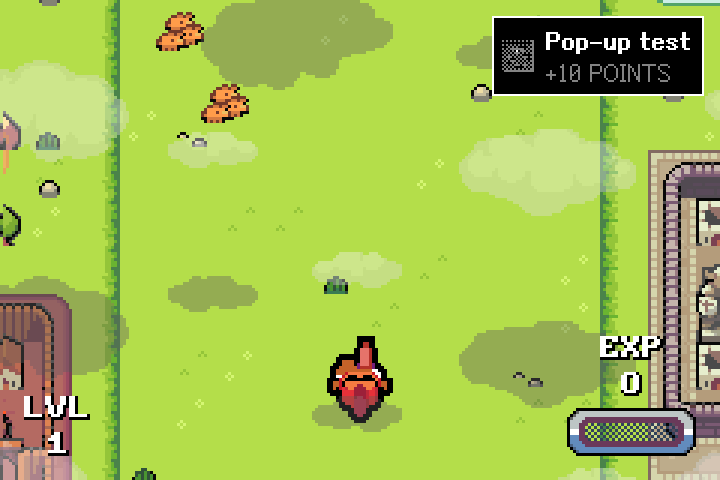
Android and iPhone. Real GBA and Game Boy cartridges play on our Game Bub, the phone recognises them, and unlocks pop up on the Game Bub's screen. The app installs the firmware over a USB-C cable and can put the original firmware back the same way.
How it works
Install once, pair once, play.
Install from the phone
Connect the Game Bub to your phone with a USB-C cable and tap Install in the app. In about a minute it runs Cheevotron's firmware, with its FPGA designs on the microSD card. No computer needed.
Pair over Bluetooth
Switch the Game Bub on and pair it in the app. From then on, the two find each other by themselves whenever the Game Bub is on.
Play
Insert a cartridge and pick Run Cartridge. The phone loads the game's achievements and follows along. Each unlock shows in the app and over the game on the Game Bub.
The first time, the Game Bub reads the whole cartridge to recognise it: about a minute for a big GBA game. After that, it starts right away.
Why the Game Bub
Game Boy Advance on real hardware, at last.
A Game Boy Advance keeps the game's working memory inside the console, so nothing plugged into an original GBA can read it. The Game Bub runs the console in its FPGA chip instead, and Cheevotron's designs for that chip let the firmware see the memory the achievements watch.
- No cable while you play
The Game Bub talks to your phone over Bluetooth. The phone can stay in your pocket.
- Saves count too
On Game Boy cartridges, the Game Bub keeps a copy of the save memory, for achievement sets that read it.
- The full app
Notifications, missable markers and unlocks that are safe when the connection drops.
Unlocks on the Game Bub
Each unlock pops up over the game for a few seconds, as a toast with badge, title and points or as the badge alone, in the spot you pick. A short chime plays in the game's sound. Choose in the app under Settings › Game Bub.
Your progress, on the console
Press Home during a game and open Achievements to see what you've unlocked and what's left, without taking the phone out.
An LCD look, if you like
Cheevotron's FPGA designs can draw a light grid over the picture, like the pixels of the original screens. Off, light or medium, in the Game Bub's settings.
What you need
A Game Bub, your cartridges, your phone.
- A Game Bub, the open-source FPGA handheld by Second Bedroom, with a microSD card inside.
- Your cartridges: Game Boy Advance, Game Boy or Game Boy Color. Backups you made of your own cartridges, on the microSD card, work too.
- A USB-C cable between phone and Game Bub, to install the firmware and its updates.
- An Android phone with Android 9 or newer and Bluetooth.
- A Cheevotron account, and later this console's connector. Sign up with your email in the app. Your first 10 achievements on this console let you try it on your own hardware, and they stay yours; for more, the connector is a one-time purchase (prices).
Game support
Real cartridges, tested one by one.
Tested on a real Game Bub
Before release we play many cartridges on our own Game Bub and check that they're recognised, that their saves stay safe and that the achievements unlock on the Game Bub.
Something doesn't work?
We can't test every cartridge. If one of yours doesn't work, write to hello (at) cheevotron (dot) com with the game's name and region, and we'll look into it.
Check your version
Achievement sets belong to specific versions of a game. The game's page on this site lists the versions it supports.
FAQ
Game Bub questions.
Do I need ROM files?
Can I go back to the original firmware?
Will my game slow down?
Are my saves safe?
Why does a new cartridge take longer to start?
Does it work without the phone?
When does the Game Bub work for everyone?
Get Cheevotron
Your GBA cartridges have achievements waiting.
Leave your email and we'll tell you the day Cheevotron is out.
One email at launch, one per release. No spam.
Want the details? Read the Game Bub guide →